Authentication
Authentication is provided by Auth0.
Setup
The API is using Auth0 as an identity provider.
Setup Auth0 config:
$ export AUTH0_DOMAIN=<auth0-domain>
$ export AUTH0_ISSUER=<auth0-issuer>
$ export AUTH0_AUDIENCE=<auth0-audience>
Authentication Flow
The authentication is using the OAuth standard. The implementation is using an Identity provider and then a JWT is issued by our API. The rationale behind this is to support multiple Identity providers, but in practice, it complexifies the authentication.
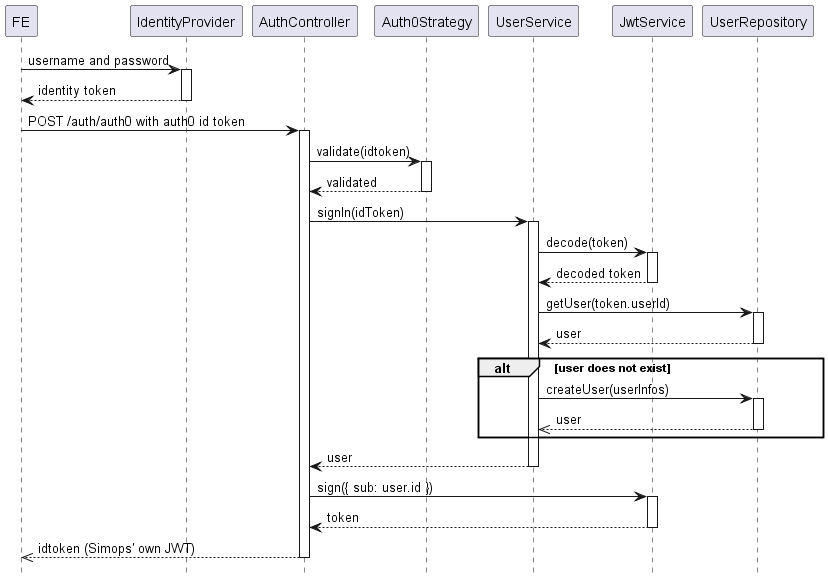
Auth0 Setup
- Using custom domain (available to free plan)
- Max 25,000 MAU
- Actions setups
Actions
To access Actions, in Auth0 Management, go to Actions -> Triggers and select post-login. Some are set:
- We add their email address
exports.onExecutePostLogin = async (event, api) => {
  if (event.authorization) {
    api.accessToken.setCustomClaim('email', event.user.email);
  }
};
exports.onExecutePostLogin = async (event, api) => {
  if (event.authorization) {
    api.accessToken.setCustomClaim('roles', event.authorization.roles);
  }
};
JWKS
https://auth.simo.ps/.well-known/jwks.json
Device Authorization Flow
See Auth0 Device Authorization Flow
Self JWKS
The API also serves a JWKS endpoint for our own JWTs that we want to sign. It's available on https://api.simo.ps/.well-known/jwks.json. The reason is because we can't have access to the private key on Auth0 when we want to use assymetric keys (RS256). We have the option to use HS256 which is using symetric key (the client secret), but it involves giving the secret to more services (ie: SimopsConnect) than necessary. Having the public key available, it's easier to rotate keys. It would involve a change in the API only.
We can use the LinqPad file in {linpad-project}/.../jwks-private-key-to-rsa.linq to generate a RSA PEM private key.